Fast and friendly network scanner
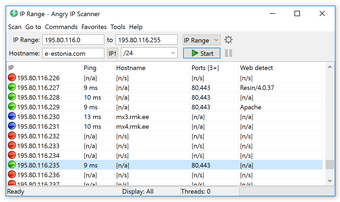
Angry IP Scanner is a cross-platform, and convenient Wi-Fi and network scanner. The software can scan the Internet Protocol addresses from any port within any distance. It's a development & IT program such that it can be quickly downloaded and installed on any desktop pc. Angry IP Scanner simply pings each IP address to check if it is still working, then optionally picks the hostname, determines the media access control address, scans the ports, etc.
Top Recommended Alternative

What is Angry IP scanner used for?
Angry IP scanner verifies dead IP addresses then optionally decides the domain name, calculates the MAC address, checks ports, and so on. The information collected on each server can be extended to include plugins. It also offers additional features such as NetBIOS information and preferred host identity. Scanning reports can be stored in a CSV, TXT, XML, or IP-Port file format.
With the assistance of plugins, Angry IP Scanner will gather information about the IPs being scanned. Anybody who can compose Java code can create plugins for Angry IP and extend the program's capability. Angry IP Scanner is a fast and efficient network scanner that tests domain names, channels by multi-thread scanning to preserve maximum efficiency, and displays the critical information of each device upon detection.
Special features included ping time, IP address, open ports, and hostname. Additional fields include filtered ports, TTL, HTTP sender, site detector, MAC address, NetBIOS info, and MAC vendor. The software is suitable for network administrators, as well as medium and big corporations, federal agencies, and financial institutions as the interface for the Angry IP Scanner is rather intuitive.
How do I run IP Scan?
Control systems and settings are restricted, and the IP range and target hostname are set to the correct defaults. Once you look for a home network, the program will able to launch itself automatically. Unlike other scanners, the report shown does not allow you to scan the long IP list manually.
Hotkeys are used to scan directly through expired, running, or accessible hosts, pick different servers, and complete the necessary activities: delete, recover, distribute multiple formats, etc. You can right-click on a particular host to find more about the network. Angry IP Scanner utilizes a number of popular approaches to locating live hosts.
When hosts fail to respond to pings, they are considered dead so they're no longer screened any further. In the Preferences dialog in the Scanning tab, this can be changed. You may also select a pinging device at the same venue. Angry IP Scanner uses a variety of connections to scan. Each host or address is checked with its own thread.
Connect with the safest channels
Whether you’re a casual PC user or an experienced network administrator, Angry IP Scanner is a program that offers you a lot of useful safety features with it come to your online activities. It will help in preventing you from connecting to poorly secured, unsafe IP addresses. You will also be able to manually screen domains that you deem safe to enter, thus ensuring a seamless browsing experience each and every time.